
Home / Time clocks and access / Access control kit
Access control kit
Access control system with card, fingerprint or phone. Every door, autonomous.
A Creasoft controller at every door, readers on both sides, an electromagnetic lock or turnstile. Rights are granted and revoked online, and attendance updates in real time.
Kit from EUR 278, excluding VAT · installation separate
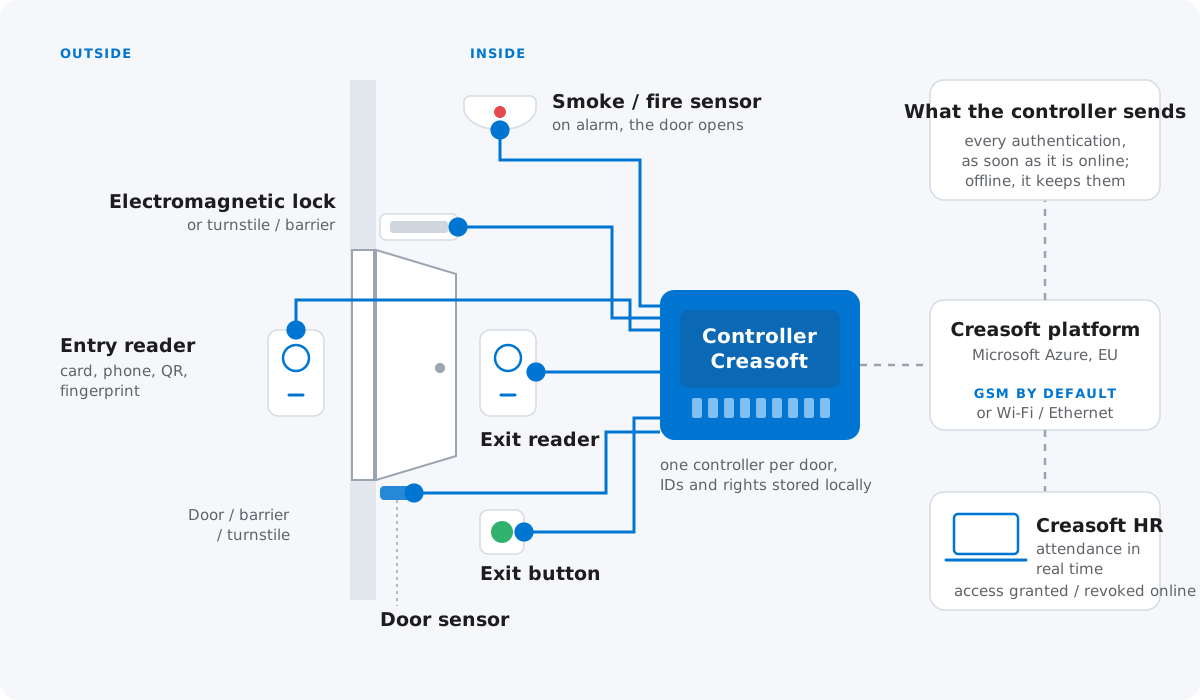
How it connects
Diagram of an access control point.
Employee IDs and their access rights are stored locally, in the memory of the Creasoft controller. If the internet or GSM goes down, the employee still opens the door.
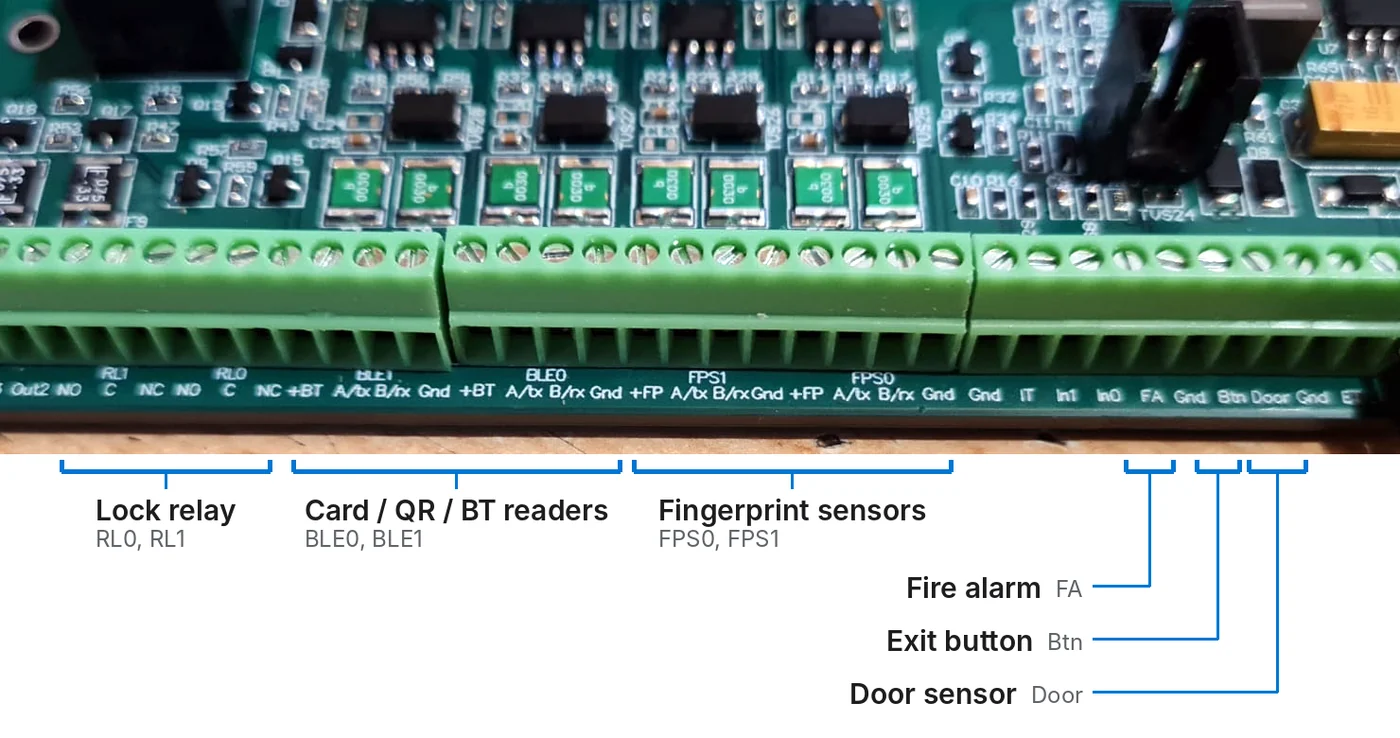
The controller
Every output, with its own job.
- Relay for the lock or turnstile (RL0, RL1)
- Card, QR and Bluetooth readers (BLE0, BLE1)
- Fingerprint sensors (FPS0, FPS1)
- Fire alarm: on signal, the door opens (FA)
- Exit button (Btn) and door sensor (Door)
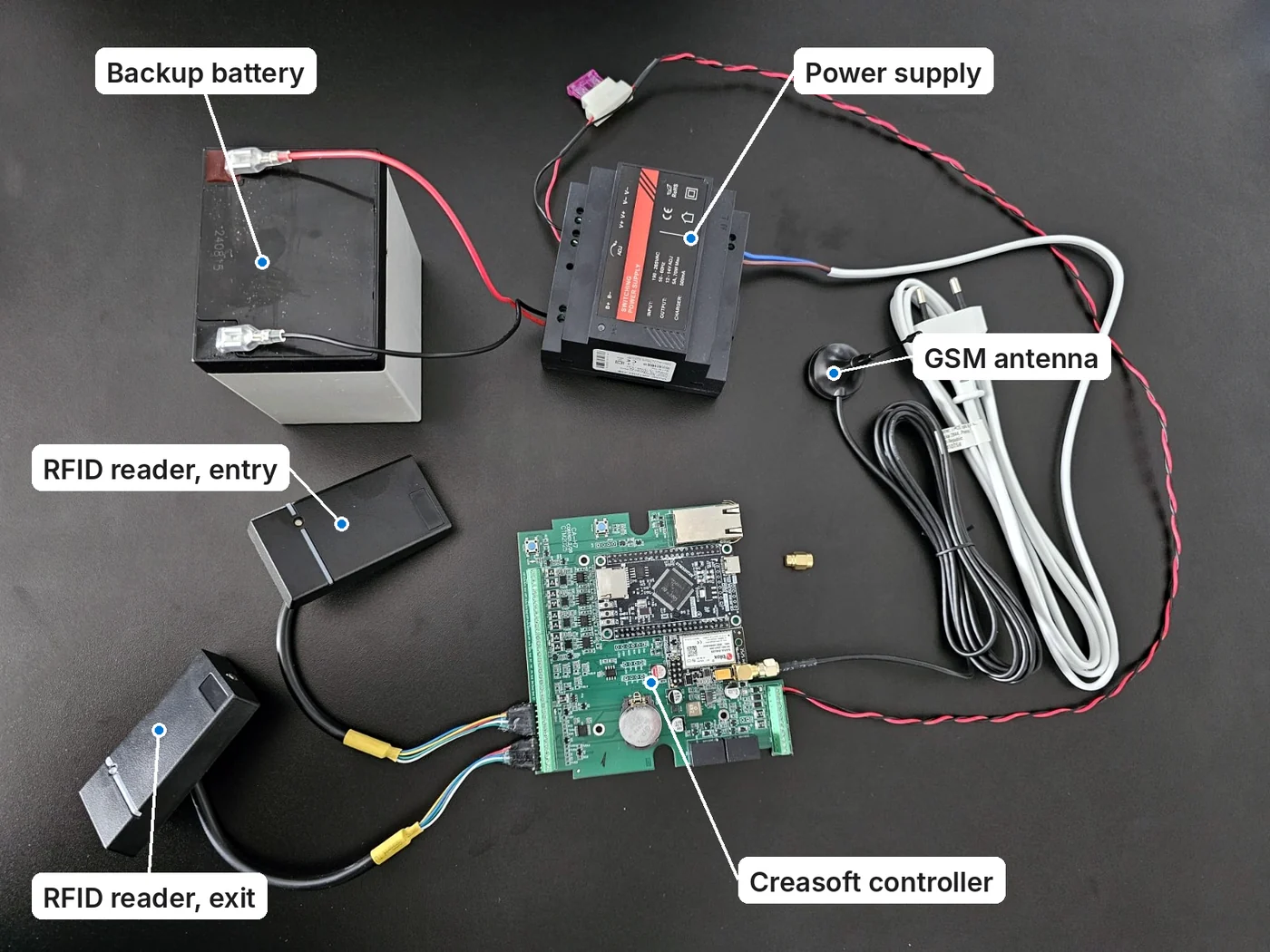
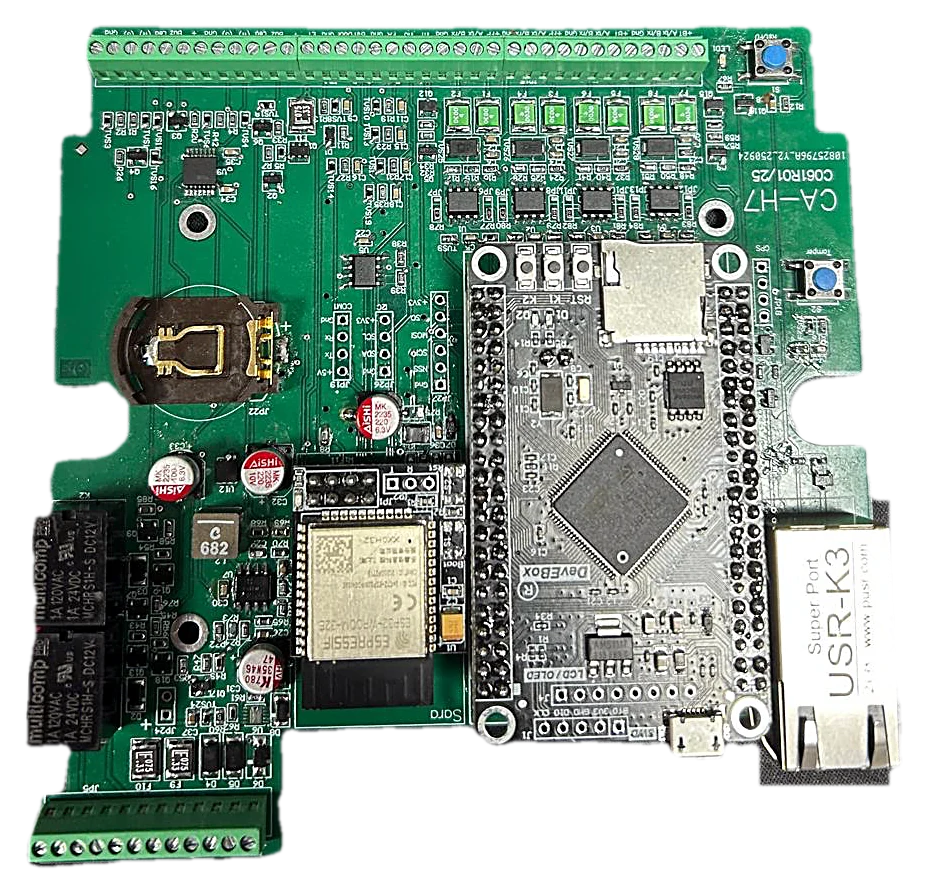
The kit
What you get in the kit.
Creasoft controller, two RFID readers, power supply, backup battery and GSM antenna.
By default, the controller ships with a GSM modem and SIM built into the board. If you prefer Ethernet, you get it with Ethernet only. If you change your mind later, we send you the GSM module, which mounts easily on the board, even by yourself.
Access control and time tracking, in the same system.
01 / Cards
IDs added and removed from the application.
The command to save or delete a new card (ID) is given from the Creasoft interface, per employee or in bulk. For an employee whose contract is suspended, access is withdrawn automatically.
02 / Real time
Attendance, updated immediately.
Every authentication is transmitted in real time, and the attendance status appears in the Creasoft application.
03 / Installation
Installed by the client or a partner.
Installation is done by the client or, optionally, by a certified security systems installer, a Creasoft partner, under a separate contract.
Access rules
Who enters, when and how often.
Access rules are set in the Creasoft application.
01 / Days
Which days.
The days on which the employee has access.
02 / Hours
Which time window.
The time windows in which the door opens for them.
03 / End date
Until when.
After the set date, access stops on its own.
04 / Entries per month
How many times.
A limited number of entries per month.
Frequently asked questions.
What is an access control system?
An access control system decides who can pass through a door, barrier or turnstile, and when. It has three parts: the readers (card, fingerprint or phone), the electronic unit that controls the opening, and the application where you set rights and see passages. At Creasoft, both the electronic unit and the web application are developed by Creasoft.
How much does an access control system cost?
The price depends on the number of doors, the type of readers and the installation. Equipment is paid once; the price configurator shows the prices for the kit, readers (RFID, fingerprint, universal) and installation. Access control settings are part of the Time Tracking and Working Time Records module, EUR 2 per employee per month, excluding VAT. The final installation price is confirmed by the installer’s offer.
Card or fingerprint access control?
An RFID card is the simplest option, but it can be lost or lent. A fingerprint cannot be lent, but it is biometric data: under GDPR the employer has to justify its use and offer an alternative to employees who do not want it. The phone with Creasoft Pass is a third option, without cards.
Who installs the system?
Installation is done by the client or, optionally, by a certified security systems installer, a Creasoft partner. The client signs a separate installation contract with the partner. The portable time tracking kit needs no installation.
Can I have access control without time tracking?
Yes. Access control can also be used separately from time tracking.
Can I have time tracking without access control?
Yes. The portable time tracking kit does not need to be mounted at a door.
Can the phone replace the card?
Yes, through the Creasoft Pass app, with Bluetooth or a dynamic QR code.
What happens if there is no signal?
The terminal stores up to 6,500 identifiers and 10,000 passages locally. Access keeps working, and passages are sent when the connection returns.
Does it integrate with payroll or the ERP?
Yes, through a free API or CSV or Excel export and import, with mapping of employee codes, departments and cost centres.
How do I add or delete an employee’s card?
From the Creasoft interface, per employee or in bulk, for several employees at once. The command to save or delete the card (ID) reaches the controller, which keeps the IDs in local memory. So if the internet or GSM goes down, the employee still opens the door.
Which access rules can I set?
The days on which the employee has access, the time windows, an end date for the access and a limited number of entries per month.
How does the controller connect to the server?
By default, the controller ships with a GSM modem and SIM built into the board. If you prefer Ethernet, you get it with Ethernet only. If you change your mind later, we send you the GSM module, which mounts easily on the board, even by yourself.
What happens when the fire alarm goes off?
The controller has an input for the smoke detector or the fire alarm panel. On signal, the door relay opens unconditionally for as long as the signal is active.
Tell us how many doors you have. We will propose the configuration.
We send you an offer for kits, readers and, if you wish, installation by our partner.
Or call sales: +40 749 500 400