Time tracking for telework
Time worked from home. Clear for both sides.
The Creasoft PC app records when work starts and ends. The employee can see it, can pause it for personal breaks and knows exactly what is recorded.
from EUR 1 per employee, per month
Price per module, excluding VAT. Implementation and equipment are calculated separately. Calculate the exact cost.
What it records. And what it does not.
Records
Active and inactive time.
- The start and end of the working day
- Long periods of inactivity, with an alert
- The names of the applications and websites used and the time spent in them
- Separation of working time from personal use, based on your list of work websites
- Optional, if the company enables it: one screenshot per hour and the number of keys pressed, not the text
Does not record
What you type.
- Typed text
- Nothing, while the app is closed
For HR, CFOs and managers.
- Attendance register and collective timesheetGenerated from the recorded working time.
- OvertimeCalculated according to the company’s schedule and rules.
- Reports and indicatorsActivity distribution by team, in the web interface.
- Remote installationThe IT administrator installs it on the company’s computers.
- Data for payrollExport or API to the payroll software.
The activity report
Working time, by application and website.
The detailed report shows, by time interval, the applications and websites used, work time, personal time and inactivity. A website’s classification changes with one click.
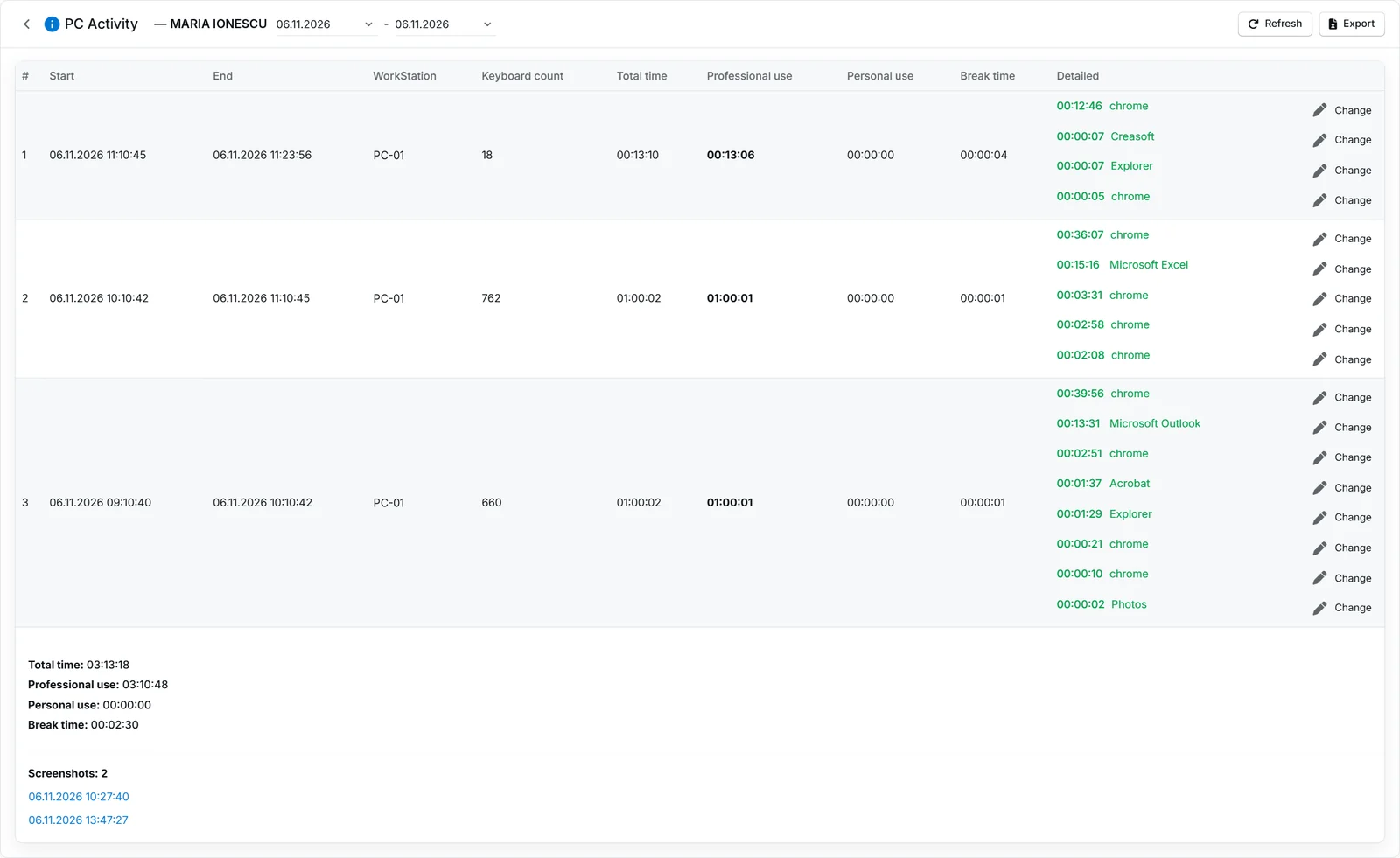
Screenshots from the Creasoft HR application. The personal data shown is not real; it has been anonymised
Frequently asked questions.
How does the PC app extract the employee’s working time?
The Creasoft PC app is installed on the computer, usually by the company’s IT administrator. The employee starts it with a double click. At start-up, a visible message tells them that, from that moment, their computer activity is monitored. Working time is calculated from this activity. Breaks without activity and browsing websites, games or films unrelated to work do not count as working time.
What happens if the employee closes the app?
Closing the app means the end of work and stops the monitoring. If the employee closes and reopens the app several times on the same day, the working time adds up.
How does the app know the employee is on a break?
For each employee, the app works out how long they usually work and how long their breaks usually are. When no key is pressed for longer than usual, a message appears on screen for 20 seconds asking whether the employee is still there. If they click, the time keeps counting as working time. If not, the message disappears and the time counts as a break until the first key is pressed.
Is monitoring PC activity legal?
The employer must inform employees and set the rules in the internal regulations and, for remote work, in the contract, under Law no. 81/2018. The Creasoft app is visible to the employee and does not record the text typed; screenshots are optional and only the company can enable them. The proportionality assessment and informing employees remain the employer’s responsibility.
Does it work without administrator rights?
Yes. There is a standard installation and a version that runs without administrator rights. Both are on the Downloads page.
Which operating systems does it run on?
The app is available for Windows.
See how it fits your company.
An online demo takes about 30 minutes. We show you time tracking, reports and documents using an example close to your company.
Or call sales: +40 749 500 400