
Home / HR guides / Optimising HR workflows
HR guide
Optimising HR workflows. Fewer steps, the same rules.
A good HR workflow has few hand-offs between people, no data typed in twice and proof for every step. This is how you find the steps that can be removed.
Last reviewed: 10.11.2026
Five workflows
The workflows that take the most time.
They repeat every month or for every employee. That is where the biggest gains are.
1 / Hiring
From candidate to contract.
The employee’s data, the contract, the REGES-Online submission and the file.
2 / Documents
Amendments, certificates, decisions.
Contract amendments, certificates, job descriptions, generated and signed.
3 / Time tracking
The working month.
The attendance register, corrections, overtime and the collective timesheet.
4 / Leave
Request, approval, document.
Requests, approvals, remaining days and the leave document.
5 / Leaving
Termination of the contract.
Termination documents, REGES-Online, inventory and door access.
Method
How to optimise a workflow, in five steps.
- Map the workflow as it is today: who does what, in which software, how long it takes.
- Mark the re-entries: the same data written twice, in two places.
- Mark the waiting times: signatures, approvals, trips to HR.
- Remove the step or automate it: template, electronic signature, Self Service, synchronisation.
- Measure again after a month and keep what worked.
| Indicator | How to measure it |
|---|---|
| Time per workflow | Minutes of HR work for a new employee, a contract amendment, a month of time tracking. |
| Re-entries | How many times the same data is written by hand. |
| Waiting | Days between the request and the approval or signature. |
| Corrections | Payroll changes after the month is closed. |
| Trips to HR | Requests made in person that could have been made from the phone. |
A simple calculation
How much does a batch of contract amendments cost?
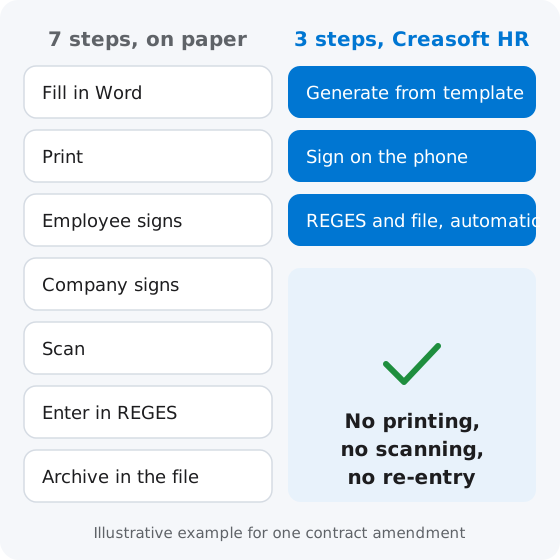
An example with assumptions, not statistics: 100 contract amendments after a minimum wage increase. On paper, at 5 minutes per amendment for filling in, printing, signing and archiving, that is 100 x 5 = 500 minutes, over 8 hours. In Creasoft HR, the same batch takes about 2 minutes of HR work: the amendments are generated, sent for signature and archived automatically. Put your company’s figures in their place.
What the law says
Electronic signature in employment documents.
Law no. 208/2021, approving Government Emergency Ordinance no. 36/2021, allows the individual employment contract to be concluded, amended, suspended and terminated with an advanced or qualified electronic signature. The employer cannot oblige the employee to use this type of signature, and both parties use the same type of signature. Electronically signed documents are also presented electronically during inspections. Electronic signature for employees
Last reviewed: 10.11.2026. Informational material; it does not replace legal analysis for your company’s situation.
Frequently asked questions.
What does optimising HR workflows mean?
It means removing from HR processes the steps that add no value: data entered twice, documents printed only to be scanned, waiting for signatures and approvals. The rules stay the same; only the road to the result gets shorter.
Where do I start?
With the workflow that repeats most often, for example monthly time tracking or contract amendments. Map it as it is today, mark the re-entries and the waiting times, then choose a single step to remove.
Can I sign the employment contract electronically?
Yes. Law no. 208/2021 allows the use of an advanced or qualified electronic signature to conclude, amend, suspend and terminate the individual employment contract. The employer cannot oblige the employee to use it, and both parties sign with the same type of signature.
What does HR software automate?
Generating documents from templates, sending them for signature, archiving them in the file, sending data to REGES-Online, calculating hours from clock-ins and the collective timesheet, and leave requests from the phone.
How do I measure whether the workflow has improved?
With the same indicator before and after: minutes of HR work per workflow, the number of re-entries, days of waiting and payroll corrections after the month is closed.
Do I have to change my payroll software?
No. Creasoft HR sends hours worked and absences to the payroll software you already use, by API or export.
HR workflows, in one system.
Documents from your templates, signature on the phone, REGES-Online and time tracking, with no data typed in twice.
Or call sales: +40 749 500 400